 Draw on a Map
The best Google Earth alternative depends on what you need to do with your map:
- To make a simple map to annotate and share, use Draw on a Map.
- To explore the globe and historical imagery in a browser, use Google Earth on the web.
- To view and edit KML on a 3D globe on Windows or mobile, use ArcGIS Earth.
- To do GIS editing, analysis, or print layouts, use QGIS.
Draw on a Map is our product. This comparison explains where it fits and when another tool is a better choice. Product information checked on 21 October 2026.
What changes for Google Earth Pro in 2027
Google will stop desktop downloads of Google Earth Pro on 25 June 2027 (Google update help). This is the end of new downloads. It is not a shutdown date.
Google says that existing users can continue to use the desktop app after that date (Google announcement). If you keep important Places in Earth Pro, save a copy before you try another tool.
Comparison table
Google Earth on the web is a Google product. It is in this table because it is an alternative to the desktop app.
| Tool | Best for | Platform | Main limit |
|---|---|---|---|
| Draw on a Map | A simple annotated map to send or share | Browser | Does not replace the Earth Pro imagery archive or KML 3D models and tours |
| Google Earth on the web | Exploring the globe and historical imagery | Browser | Imagery dates and coverage vary by area |
| ArcGIS Earth | Viewing and editing KML on a 3D globe | Windows, iOS, Android | No native Mac desktop version. Some data services need a subscription or credits |
| QGIS | GIS editing, analysis, and map layouts | Desktop application | A full GIS tool, so it takes more time to learn. It does not include Google’s imagery archive |
Sources: Google imagery guide, Esri FAQ, Esri data guide, QGIS overview.
When Draw on a Map is a good fit
If you use Earth Pro to mark places and send the result to another person, Draw on a Map can serve that task.
An example: you must send a client a map of a site. You draw the site boundary as a shape. You draw the access route as a line. You add a marker at the entrance. Then you send a share link to the client. The client opens the link in a browser and does not need to install software.
For more about drawing on a map, read how to draw on Google Maps.
Free and paid limits:
- Drawing, KML/KMZ import, and standard share links are free.
- You need an account to save maps to the cloud.
- PNG and PDF exports have a watermark. You must pay to export without the watermark.
Limits: Draw on a Map does not replace the Earth Pro imagery archive. It does not display KML 3D models or tours. If your work depends on these features, use a different tool from the table.
Move a KML or KMZ file from Earth Pro
1. Save your Places in Earth Pro
These steps are for the desktop app, not Google Earth on the web.
- Open Google Earth Pro.
- In the Places panel, find the folder or place that you want to keep.
- Right-click the folder or place.
- Select Save Place As.
- Select KMZ or KML as the file type, and save the file.
On a Mac, use Control-click to open the menu. See the Google save guide and desktop folder instructions.
To save all your work in one file, save the top folder that contains it. Keep the original file after the transfer.
2. Import the file
- Open Draw on a Map.
- Select Import.
- Choose your KML or KMZ file.
KML and KMZ files can be up to 15 MB. Start with a small folder if your project is large. You can also download our example site map and try the import steps before you use your own file. The example has a fictional work area, access route, and entrance near Annecy. It is a sample KML file, not a customer project or a file exported from Earth Pro.
3. Check the imported content
Do not assume that every part of the file transferred correctly. Examine these items:
- Names. Make sure that each place, line, and shape has the correct name.
- Geometry. Make sure that points are in the correct positions. Make sure that lines and shapes have the correct form.
- Styles. Compare colors, line widths, and icons with the original. Some styles can change.
- Folders. Make sure that the items you need are present. The folder structure of the original file may not stay the same.
- Skipped content. Draw on a Map tells you about content that it did not import. Read this report. KML 3D models and tours are not displayed.
Linked files need extra care. A KML file can refer to images or other files at a different location. Draw on a Map supports image overlays, but it cannot always load linked content. Network links and linked resources may not transfer. If an item is missing, add it again by hand, or keep the original tool for that content.
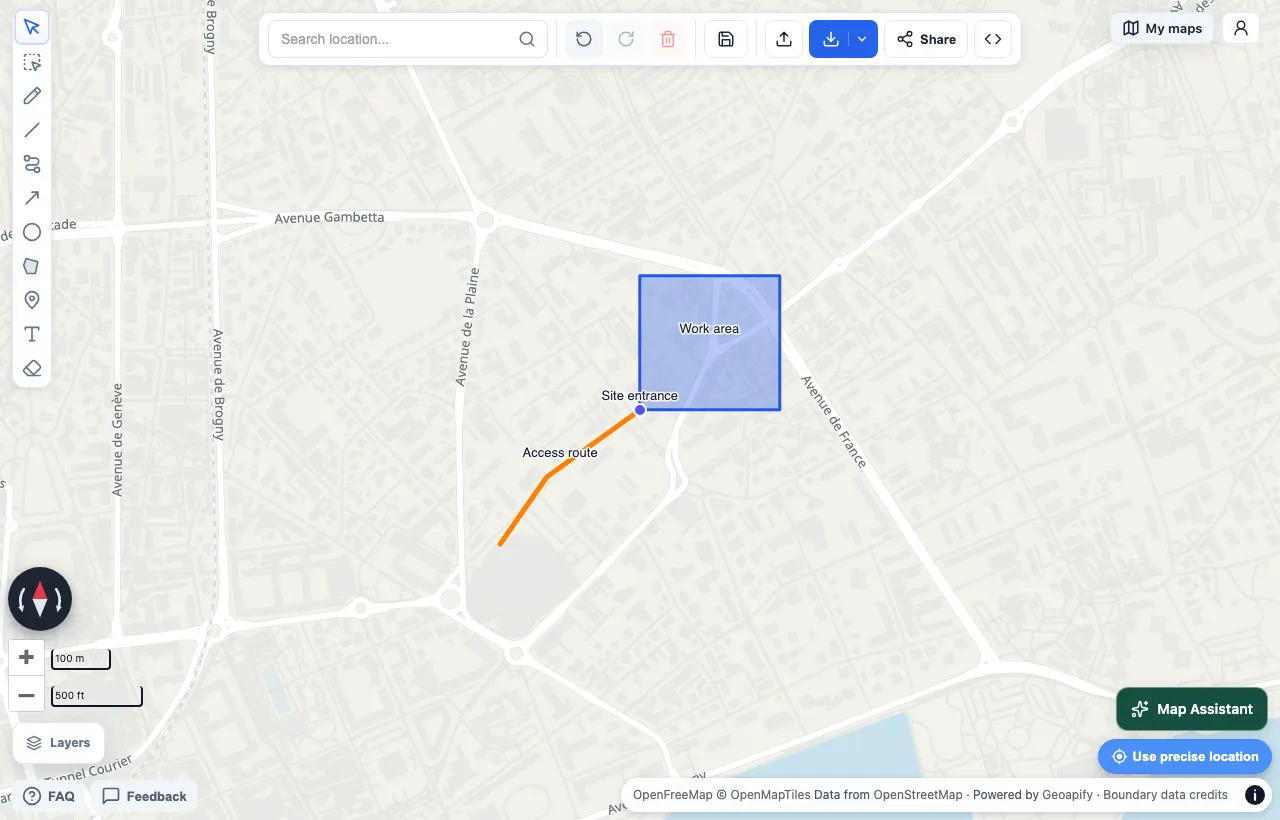
Our sample KML after import, with labels enabled in Layers. These are fictional locations for the example.
When a different tool is a better fit
Google Earth on the web. Use it to explore places and look at historical imagery in a browser (Google imagery guide). It is the nearest option if you only want to keep using Google’s globe. Imagery dates and coverage vary by area.
ArcGIS Earth. Use it if you want a 3D globe and you work on Windows, iOS, or Android. It is free to download and use (Esri FAQ). It can add and edit KML, and it supports folders and overlays (Esri data guide). Some data services need a subscription or credits.
QGIS. Use it for GIS work: data editing, analysis, and print map layouts. It is free and open source (QGIS overview). It is more complex than the other tools. It does not include Google’s imagery archive.
Frequently asked questions
Is Google Earth Pro discontinued?
Google will stop new desktop downloads of Earth Pro on 25 June 2027. This is not a shutdown date. Google says that existing users can continue to use the desktop app after that date.
Is there a free Google Earth alternative?
Yes. Google Earth on the web is free in a browser. ArcGIS Earth is free to download and use on Windows, iOS, and Android. QGIS is free and open source. In Draw on a Map, drawing, file import, and standard share links are free.
Can I open my Google Earth Pro KML or KMZ file in Draw on a Map?
Yes. Open the app, select Import, and choose your KML or KMZ file. After import, check names, shapes, styles, and folders. Draw on a Map tells you about content that it skipped. It does not display KML 3D models or tours.
Does Draw on a Map replace Google Earth Pro?
Not for all tasks. It does not replace the Earth Pro imagery archive or KML workflows for 3D models and tours. It is a good fit when you need a simple map that you can annotate and share.
Try your map file
If your task is a simple map to annotate and share, try it with your own file. Open Draw on a Map, select Import, and choose your KML or KMZ file. Then check the result against the list above.
 Maptive
 Scribble Maps